
Plugin for WooCommerce stores
Courier rates, booking and tracking inside your WooCommerce store
ParcelOps for WooCommerce is a free plugin for online stores whose courier runs ParcelOps.
Customers see your courier’s live prices at checkout. Orders are booked with the courier the moment they are ready. Tracking and proof of delivery come back onto the order, without anyone copying a waybill number.
How it works
From checkout to doorstep, on the order
The plugin follows each order through its life, so the store owner sees everything in WooCommerce and the courier sees everything in ParcelOps. The order screens are from the plugin in a test store.
- 1At checkout
Your courier's real price for every address
Customers pick from the services you choose, priced live from your courier's rates for their suburb. A suburb the courier does not know gets a friendly message with suggestions.
Shipping optionsEconomyR80.00OvernightR160.00We could not find “Marshaltown”. Please check the suburb or town and the postal code. Did you mean: Marshalltown? - 2When the order is placed
Booked with the courier, once
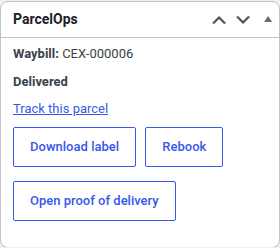
Book automatically when an order reaches Processing or Completed, or press one button on the order. The waybill number and label appear in a ParcelOps box on the order.
- 3Out for delivery
Tracking and proof of delivery come back
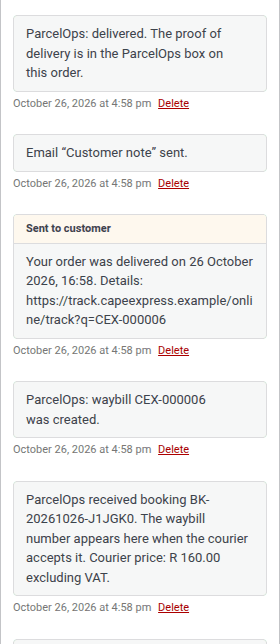
Status updates arrive on the order as notes, the customer is told when the parcel is out and when it is delivered, and the signed proof of delivery opens from the order.
Your rules
You decide what customers see
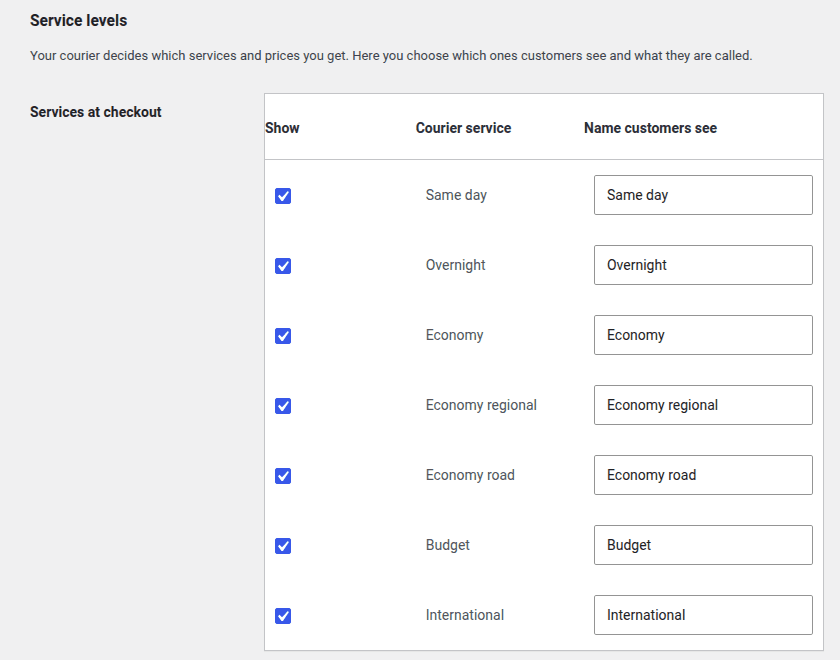
Your courier decides which services and prices your account gets. The plugin decides how they appear in your shop.
- Choose which courier services customers see, and what each is called
- Add a fixed amount or a percentage to the courier price
- Free shipping above an order value you set
- A backup flat rate for the rare moment the courier cannot be reached
- Require a recognised address, or let unknown suburbs through with a warning
- Book on Processing, on Completed, or only when you press the button
Set up
Connected in four steps
- 1
Create an API key
In your courier's customer portal, open Integrations, then API keys, and create a key for the store.
- 2
Install the plugin
In WordPress, go to Plugins > Add New, search for ParcelOps for WooCommerce, then install and activate it.
- 3
Paste the key
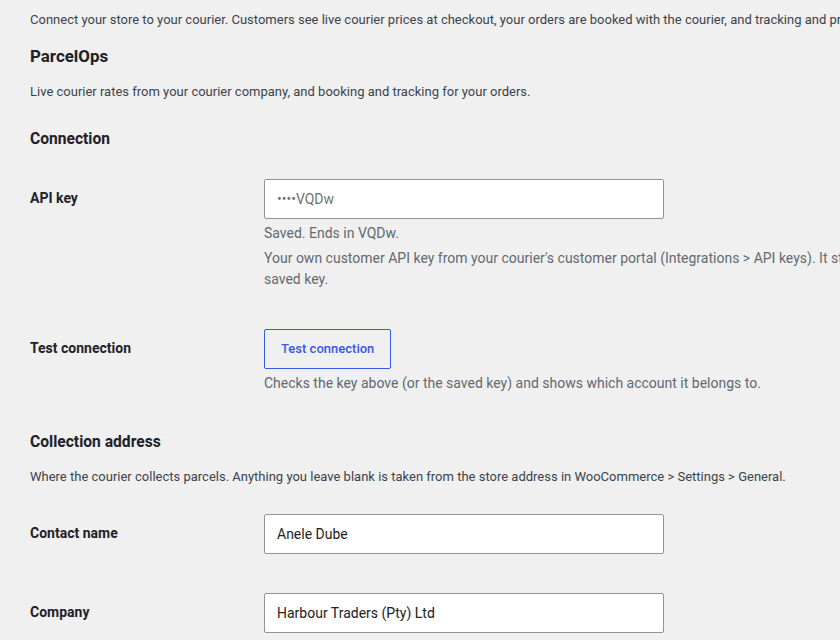
Under WooCommerce > Settings > Shipping > ParcelOps, paste the key and press Test connection. Your account name appears.
- 4
Add it to your zone
Add the ParcelOps method to your South Africa shipping zone, and press Create webhook so tracking flows back.
For courier companies
Give your online-store customers a checkout that books with you
E-commerce clients pick the courier that plugs into their shop. On ParcelOps, every customer with a WooCommerce store can connect to you today, at no extra cost.
Bookings arrive on their own
A store's orders reach you as bookings with the shop's order number on them, ready for your team to accept. Nobody retypes an address from an email.
Your rates, your margins
Checkout prices come from the rate card you already gave that customer. Change the card and the store's prices follow.
No developer needed
Your customer installs a free plugin and creates their own key in your customer portal. Keys only reach their own account.
Fewer where-is-my-parcel calls
Tracking, delivery notes and proof of delivery land on the store's own orders, so their customers ask them less, and they ask you less.
Questions
WooCommerce plugin questions
Who can use ParcelOps for WooCommerce?+
Any South African online store on WooCommerce whose courier company runs ParcelOps. The store needs a customer account with that courier and its own API key from the courier's customer portal, under Integrations then API keys. The plugin itself is free from the WordPress plugin directory.
Where do the prices at checkout come from?+
From the rates your courier has set for your account, for the address the customer types. The plugin shows them exactly as the courier quotes them, without VAT; with the shipping method set to taxable, WooCommerce adds VAT as your tax settings say. You can add a fixed amount or a percentage, rename services, hide some, and offer free shipping above an order value.
What if the courier cannot be reached during checkout?+
Checkout waits at most four seconds for a price. If the courier's system cannot be reached, a backup flat rate you set is shown instead, so you keep selling. It is never shown when the courier has no price for the address or does not know it.
Can an order be booked twice by accident?+
No. Every booking carries a key made from the order itself, so a repeated click or a repeated request gets the first booking back and no second parcel is booked. To send an order again on purpose there is a separate Rebook button.
Does it work with the new block checkout?+
Yes. Live rates show in both the classic checkout and the cart and checkout blocks, and the plugin works with WooCommerce's high-performance order storage.
What do my customers see after they order?+
Their order emails and the My Account order page carry the tracking link. Order notes tell them when the parcel is out for delivery and when it was delivered, and you can open the proof of delivery from the order in your admin.
I run a courier company. What does it cost me?+
Nothing extra. A store's bookings arrive in ParcelOps like any other customer booking and count as normal waybills on your plan. Your customer installs the plugin and creates their own API key in your customer portal, so there is no developer work on your side.
Get started
Connect your store to your courier today
Install the free plugin from WordPress.org, paste your API key, and the next order is priced, booked and tracked.
WooCommerce is a trademark of Automattic Inc. ParcelOps is not affiliated with or endorsed by Automattic.